

- Anonymouskeyboard_arrow_down

Summary:
This article shows how you customize site settings.
- You can set your name and email.
- You can set your preferred language
- You can set your chart preferences
- You can manage and delete your account
- You can set your sharing preferences
Note: Mobile browsers have a simplified UI which may not contain all controls. For best experience, a desktop browser is recommended.
Customize General settings:
- Navigate to the "Site Settings" page using the main menu.
- Fill in the details as desired.
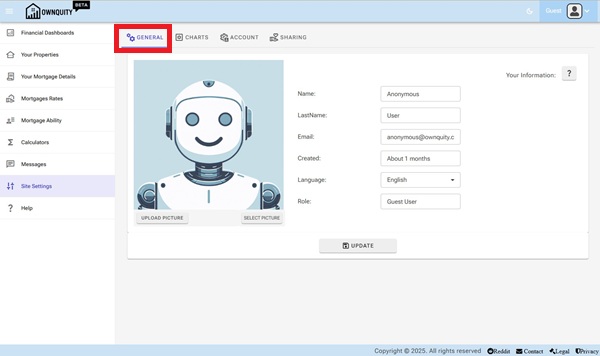
Email for registered user is used to send notifications (if enabled)
Email for Guest users is not used.
Name is used when contacting other users.
Language is used as default when searching for mortgage specialst and realtors that can speak the same language.
3.Click the "Update" button to update your information.
Customizing Chart settings
- Navigate to the "Site Settings" page using the main menu.
- Click on the "Charts" Tab
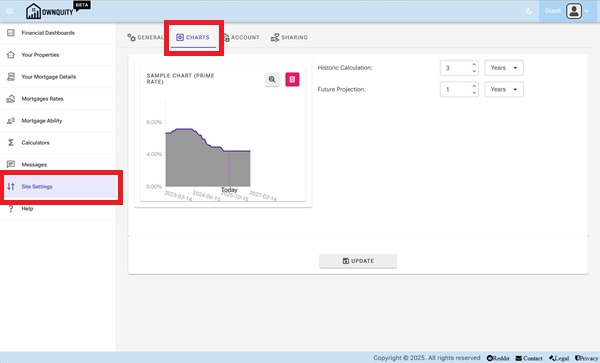
The chart settings controls how your dashboards look.
Here you can set the time period for charts.
3.Click the "Update" button to update your information.
Manage settings
- Navigate to the "Site Settings" page using the main menu.
- Click on the "Account" Tab
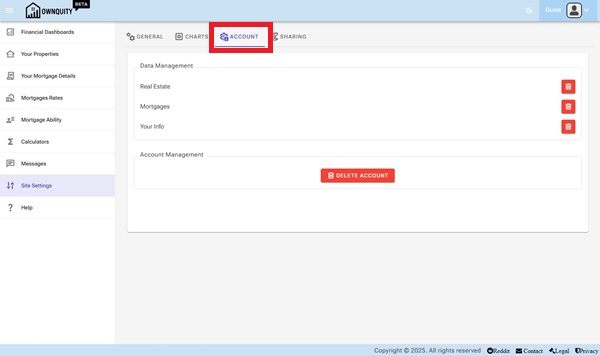
Here you can delete all your mortgages, properties, your information or your entire account.
Customizing Data Sharing settings
- Navigate to the "Site Settings" page using the main menu.
- Click on the "Sharing" Tab
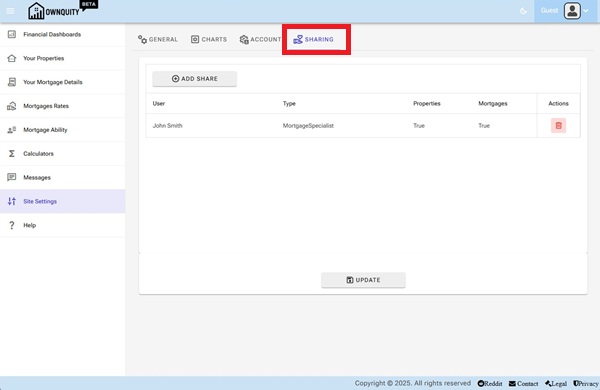
The sharing settings controls if you like to share your info with mortgage specialists or realtors.
This allows them to contact you with special offers or notify you of important events.
3.Click the "Update" button to save sharing options.
Additional Information:
- See accounts article on the difference account types.