

- Anonymouskeyboard_arrow_down

Summary:
The Mortgage Payment Calculator estimates your regular mortgage payment based on the loan amount, interest rate, amortization period, and payment frequency.
Use this calculator to compare different rate and amortization scenarios before committing to a mortgage.
Note: Mobile browsers have a simplified UI which may not contain all controls. For best experience, a desktop browser is recommended.
How to open the calculator:
- Navigate to the Calculators page using the main menu.
- Find Payment Calculator in the list and click the calculator icon to open it.
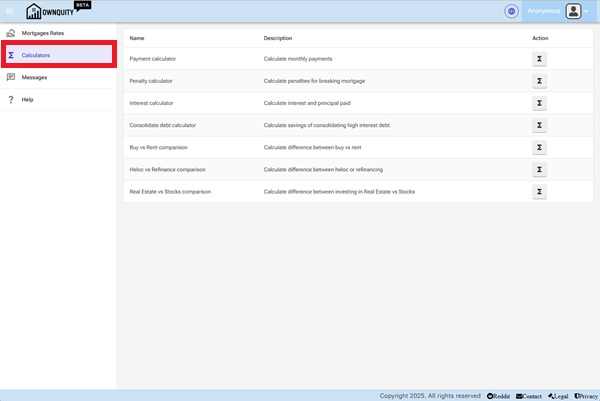
[Screenshot: Calculators page showing the list of available calculators]
Input Parameters:
| Parameter | Description |
|---|---|
| Borrowed Amount | The principal loan amount (e.g. the mortgage balance). |
| Interest Rate (%) | The annual mortgage interest rate. |
| Amortization (Years) | The total number of years to repay the mortgage in full. |
| Payment Frequency | How often payments are made (Monthly, Bi-Weekly, Weekly, etc.). |
You can also click Select Mortgage to pre-fill the rate and amortization from a saved mortgage product.
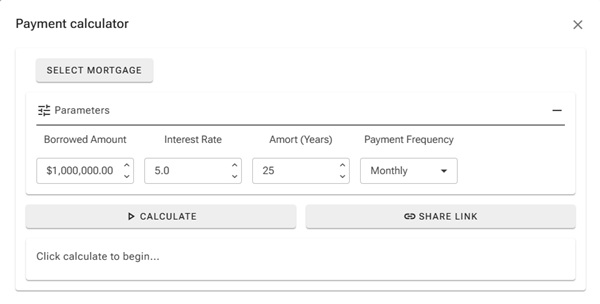
[Screenshot: Payment calculator with inputs filled in]
Reading the Results:
The results section shows:
- The payment amount per period (e.g. monthly payment).
- Total interest paid over the full amortization.
- Total amount paid (principal + interest).
- A payment breakdown comparing interest vs. principal over time.
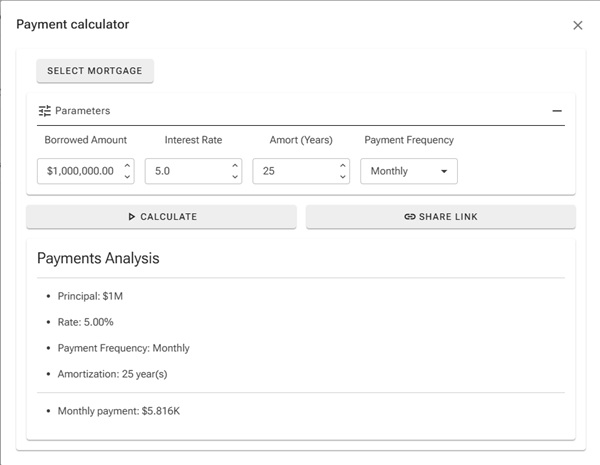
[Screenshot: Payment calculator results showing breakdown]
Tips:
- A shorter amortization period means higher payments but significantly less total interest paid.
- Increasing payment frequency (e.g. Bi-Weekly Accelerated) can shorten your amortization and save thousands in interest.
- Use the Share Link button to save or share a specific scenario.
Additional Information:
- See the Penalty Calculator help article to estimate break costs before changing your mortgage.
- See the Interest Calculator help article to see how much interest is accrued over a specific term.