

- Anonymouskeyboard_arrow_down

Summary:
The Interest Calculator shows how much total interest and principal you will pay over a specific mortgage term (not the full amortization).
This is useful when you want to understand the true cost of your mortgage during a fixed term before renewal.
Note: Mobile browsers have a simplified UI which may not contain all controls. For best experience, a desktop browser is recommended.
How to open the calculator:
- Navigate to the Calculators page using the main menu.
- Find Interest Calculator in the list and click the calculator icon.
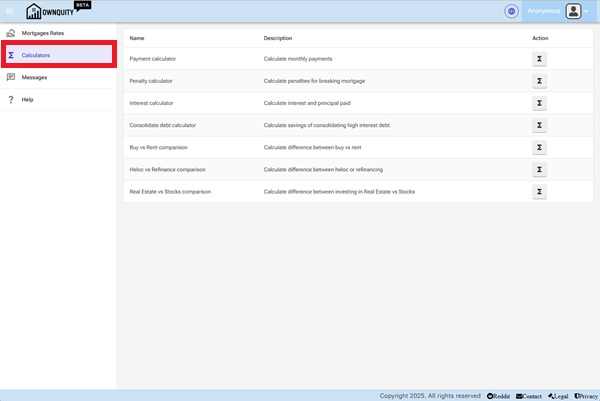
[Screenshot: Calculators page showing the list of available calculators]
Input Parameters:
| Parameter | Description |
|---|---|
| Borrowed Amount | The current outstanding mortgage balance. |
| Interest Rate (%) | The annual mortgage interest rate for the term. |
| Term Left (Years) | The length of the term to analyse (e.g. 5 years). |
| Amortization (Years) | The remaining amortization used to calculate the payment amount. |
| Payment Frequency | How often payments are made (Monthly, Bi-Weekly, Weekly, etc.). |
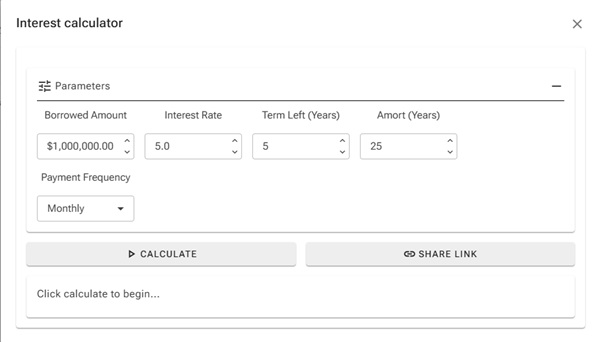
[Screenshot: Interest calculator with inputs filled in]
Reading the Results:
The results show for the specified term:
- The regular payment amount per period.
- Total interest paid during the term.
- Total principal repaid during the term.
- Remaining balance at the end of the term.
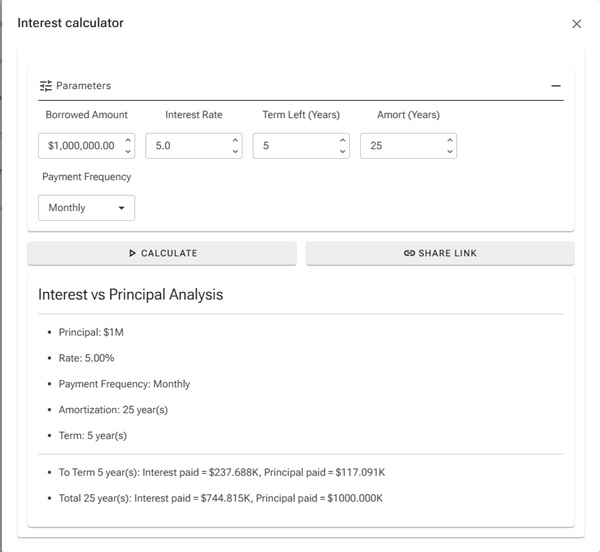
[Screenshot: Interest calculator results showing interest vs principal split]
Tips:
- Use the term length (e.g. 5 years) rather than the full amortization to see what you actually pay before your next renewal.
- Even a 0.25% rate difference can result in thousands of dollars difference in interest paid over a 5-year term.
- Use the Share Link button to compare two scenarios side by side in separate browser tabs.
Additional Information:
- See the Payment Calculator help article for full amortization payment details.
- See the Penalty Calculator help article to estimate what it would cost to break your term early.