

- Anonymouskeyboard_arrow_down

Summary:
This article shows how you can add additional information to help calculate your mortgage ability.
When calculating mortgage eligibility, information such as your income, debts are used to calculate how much you can borrow.
Adding this information allows calculations to be accurate and reflect your situation.
Note: Mobile browsers have a simplified UI which may not contain all controls. For best experience, a desktop browser is recommended.
Accessing your mortgage information:
- Navigate to the "Mortgage Ability" page using the main menu.
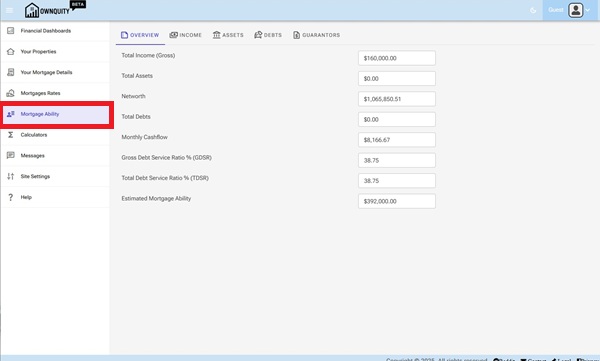
The Overview Tab shows your current mortgage situation. This is a readonly page and not for editing. When you update your information in the other Tabs (Income, Assets, Debts, Guarantors), as well as update your Mortgage and Properties, The overview tab will automatically be recalculated to reflect the new changes.
- Total Income represents the information filled in the Income Tab as well as any income generating assets under the Asset Tab.
- Total Assets represents the aggregate value of assets in the Assets Tab
- Total Debts represents the aggregate value of debts in the Debts tab
- GDSR represents your gross debt service ratio, comparison of your monthly income to housing costs (Mortgage, property taxes, heat and fees)
- TDSR represents your total debt service ratio, comparison of your monthly income to housing costs as well as other debts (loans and credit cards)
Modifying your income situation
- Navigate to the "Mortgage Ability" page using the main menu.
- Click on the "Income" Tab
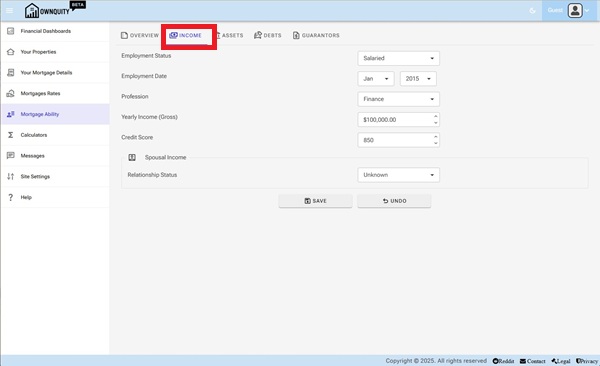
The Income Tab allows you to add employment details that can help determine if you are eligible for mortgage.
- Employment Status
- Salaried employees are the most straight forward for mortgage applications.
- Self Employed employees carry risk of financial stability. Usually an average of two years income is used during mortgage calculations.
- Commissioned employees also carry risk of financial stability. Usually an average of two years income is used during mortgage calculations.
- Unemployed. Passive income is solely used during mortgage calculations
- Profession
- Select your profession area. They may have an impact during mortgage approvals.
- Yearly Income
- Enter in your estimated yearly income.
- For Salaried employees, enter your yearly salary
- For Self Employed/ Commissioned employees, enter in your average salary from last two years.
- Enter in your estimated yearly income.
- Credit Score
- Enter in your credit score. This is an important number in determining mortgage eligibility.
Spousal Income maybe also used during mortgage calculations
- Enter in spousal income details if you wish to consider this in mortgage eligibility.
3, Click the "Save" button to save your income details to your account.
Modifying your assets
- Navigate to the "Mortgage Ability" page using the main menu.
- Click on the "Assets" Tab
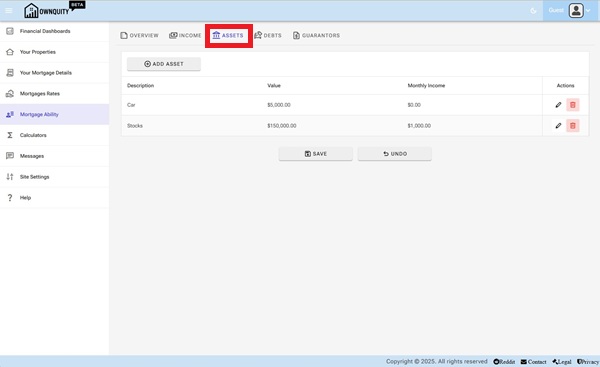
- Add assets by using the "Add Asset" Button.
- Delete assets by using the "delete" button under the "Actions" column of the "Assets" tab.
- Modify asset information using the "edit" button under the "Actions" column of the "Assets" tab.
Assets Tab allows you to add assets that may give you passive income. Assets maybe also used for collateral mortages against their value.
Modifying your debts
- Navigate to the "Mortgage Ability" page using the main menu.
- Click on the "Debts" Tab
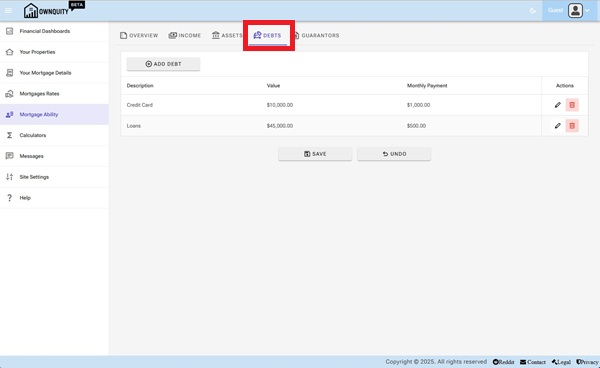
- Add debts by using the "Add Debt" Button.
- Delete debts by using the "delete" button under the "Actions" column of the "Debts" tab.
- Modify debt information using the "edit" button under the "Actions" column of the "Debts" tab.
Debts Tab allows you to add debts that may affect your monthly income. This information is used during calculating TDSR/GDSR ratios during mortgage eligibility calculations.
Modifying your guarantors
- Navigate to the "Mortgage Ability" page using the main menu.
- Click on the "Guarantors" Tab
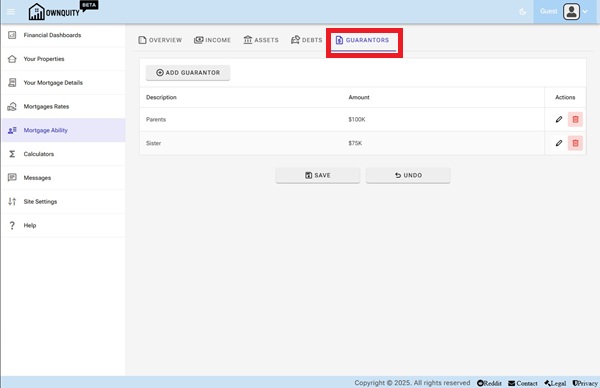
- Add guarantors by using the "Add Guarantor" Button.
- Delete guarantors by using the "delete" button under the "Actions" column of the "Guarantors" tab.
- Modify guarantor information using the "edit" button under the "Actions" column of the "Guarantors" tab.
Guarantors are optionally considered during mortgage calculations if your income is not enough to qualify for a mortgage.
Additional Information:
- See Adding Mortgage article on how to add mortgages against your home.
- See Home Calculations article on what calculators are available with your home.