

- Anonymouskeyboard_arrow_down

Summary:
This article shows how you can add a mortgage to your account.
Adding mortgages to your account will help you:
- Track the debt aspects of your home over time.
- Provide a way to calculate financial impact of switching mortgages, renewing mortgages, prepayment of mortgage principal and refinancing options.
Note: Mobile browsers have a simplified UI which may not contain all controls. For best experience, a desktop browser is recommended.
Steps to add a mortgage:
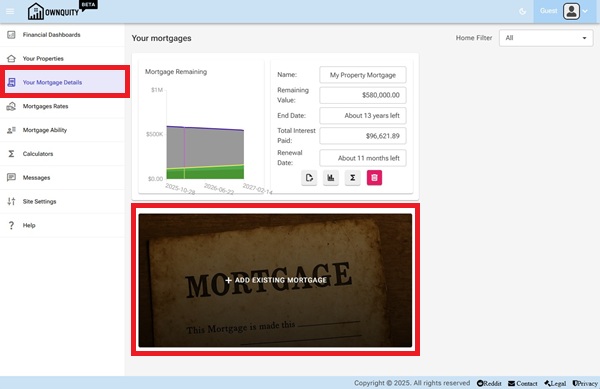
- Navigate to the "Your Mortgage Details" page using the main menu.
- Click on the "Add Existing Mortgage" tile
- Fill in the required details about the mortgage in the form that appears.
- Select a property that the mortgage is against, this will be used to calculate equity in the property.
- Select a lender for the mortgage. This will be used in calculators to help choose renew options.
- Enter a description, this will be shown as mortgage name in the dashboard.
- Enter the current amount left on the mortgage. The initial amount is automatically calculated based on the interest rate and start date.
- Enter the interest rate. For variable mortgages, this is converted into a BOC prime rate difference to automatically track when interest rates change.
- Enter the start/Maturity date for the mortgage. You can lock either of the dates, and use the Mortgage Term to automatically set the other value.
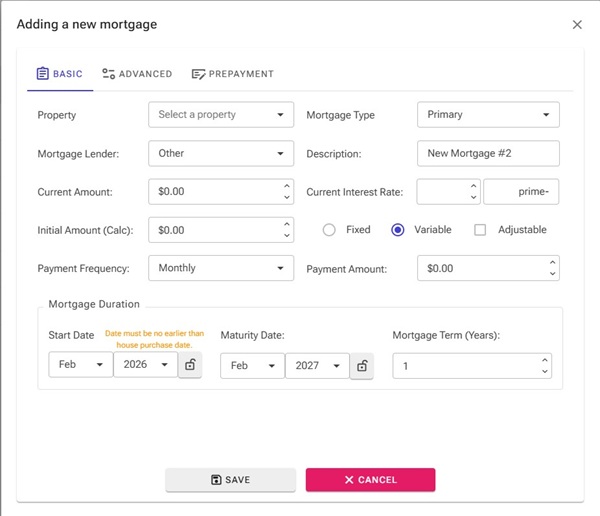
- Click the "Save" button to save the mortgage to your account.
Additional Information:
- See Adding Home article on how to add homes to your account.
- See Mortgage Calculations article on what calculators are available with your mortgage.
- See Mortgage Chart article on how to interpret the generated charts for your mortgage.
- See dashboard article on how to interpret the dashboards for your home equity.
Summary:
This article shows how you can add a mortgage to your account.
Adding mortgages to your account will help you:
- Track the debt aspects of your home over time.
- Provide a way to calculate financial impact of switching mortgages, renewing mortgages, prepayment of mortgage principal and refinancing options.
Note: Mobile browsers have a simplified UI which may not contain all controls. For best experience, a desktop browser is recommended.
Steps to add a mortgage:
- Navigate to the "Your Mortgage Details" page using the main menu.
- Click on the "Add Existing Mortgage" tile
- Fill in the required details about the mortgage in the form that appears.
- Select a property that the mortgage is against, this will be used to calculate equity in the property.
- Select a lender for the mortgage. This will be used in calculators to help choose renew options.
- Enter a description, this will be shown as mortgage name in the dashboard.
- Enter the current amount left on the mortgage. The initial amount is automatically calculated based on the interest rate and start date.
- Enter the interest rate. For variable mortgages, this is converted into a BOC prime rate difference to automatically track when interest rates change.
- Enter the start/Maturity date for the mortgage. You can lock either of the dates, and use the Mortgage Term to automatically set the other value.
- Click the "Save" button to save the mortgage to your account.
Additional Information:
- See Adding Home article on how to add homes to your account.
- See Mortgage Calculations article on what calculators are available with your mortgage.
- See Mortgage Chart article on how to interpret the generated charts for your mortgage.
- See dashboard article on how to interpret the dashboards for your home equity.